
Table of Contents
- What You'll Need Before You Start
- How to Check Warranty by IMEI and Serial Number
- Seller Warranty vs Manufacturer Warranty: What's the Difference?
- What Does a Refurbished Warranty Cover (and What It Doesn't)
- How to Read Warranty Documents and Terms
- How to Verify Refurbished Device Warranty Terms Through Seller Credibility
- How to File a Warranty Claim
- Conclusion
- Frequently Asked Questions
Last Updated: September 16, 2026
What You'll Need Before You Start
Verifying a refurbished device warranty starts before you open the box.
Gather these before you begin:
- The IMEI or serial number for the device
- Your proof of purchase, including the order confirmation email
- The listing page or invoice showing the advertised condition grade
- The seller's written warranty terms, saved as a PDF or screenshot
- The original retail packaging, if the seller shipped it
How to Check Warranty by IMEI and Serial Number
The fastest way to check warranty by IMEI is to run the device's identifier through the manufacturer's own coverage tool, which shows what the original manufacturer still honors, independent of the seller's promises. Find it in device settings under General, then About, and write it down exactly.
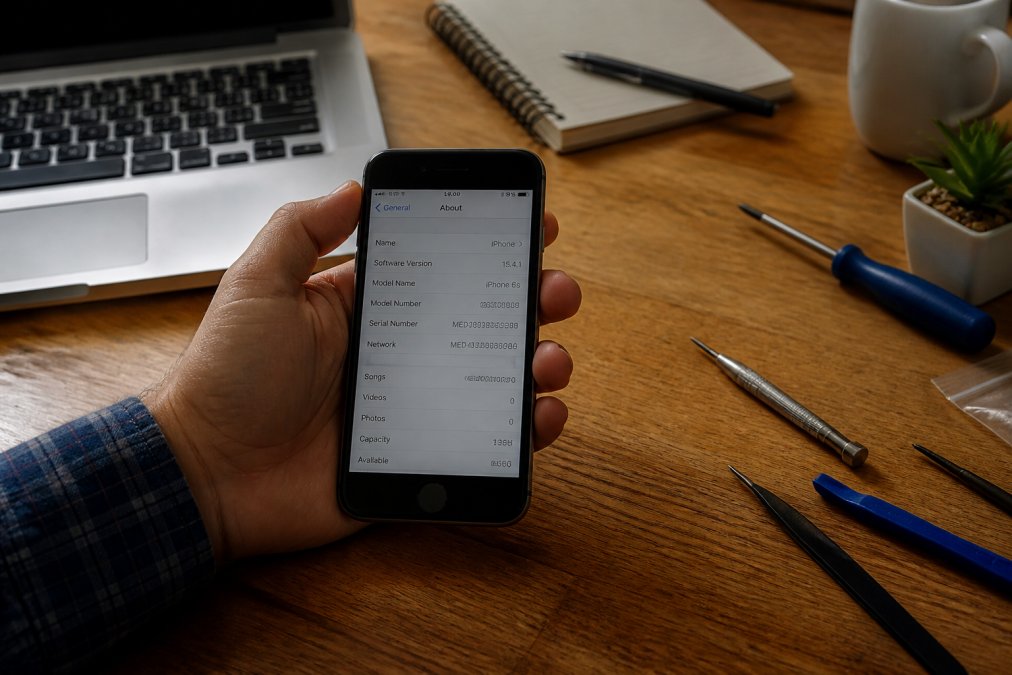
Using Apple's Coverage Checker
Apple's coverage checker is the reference point for any refurbished Apple product. Enter the serial number at Apple's official warranty page to see the model identifier, estimated purchase date, and whether limited warranty or AppleCare remains active.

Checking Samsung and Other Brands
Samsung, Google, and most Android manufacturers run similar serial-based lookups through their official support portals or regional service pages. Enter the IMEI, confirm the model matches the listing, and note the coverage status shown.
Seller Warranty vs Manufacturer Warranty: What's the Difference?
Seller warranty vs manufacturer warranty comes down to who pays when something fails. A manufacturer warranty is issued by the original maker and honored at authorized service centers. A seller warranty is issued by the reseller and honored through their own repair network or a third-party provider. A third-party warranty is a separate service contract sold by an independent administrator.
| Warranty Type | Issued By | Where Claims Go | Typical Coverage Window | Who Decides Approval |
|---|---|---|---|---|
| Manufacturer | Original device maker | Authorized service center | Remaining term from original activation | Manufacturer service tech |
| Seller | The reseller | Seller's support team or partner | Fixed term from your purchase date | Seller's support team |
| Third-party | Independent administrator | Administrator's claim portal | Varies by contract | Administrator's adjuster |
How Third-Party Warranty Claims Actually Work
A third-party warranty is not a promise from the company that built the device. It is a service contract administered by a separate company that may have no relationship to the manufacturer, the reseller, or your repair shop, and that distance is where most claim friction lives.
The typical sequence looks like this:
- Registration window. Many administrators require registration within a set number of days of purchase, often 30, or the contract is void before it starts.
- Pre-authorization. Most contracts require you to open a claim, get a claim number, and receive approval before any work begins. Work performed without pre-authorization is routinely denied.
- Proof of maintenance. Some administrators require receipts showing you followed the manufacturer's care instructions, such as using approved chargers. This is uncommon on manufacturer warranties but standard on service contracts.
- Deductible or service fee. Unlike a manufacturer warranty, a third-party contract often carries a per-claim deductible or shipping fee. Read the contract for this line before you assume the repair is free.
- Depreciation or replacement schedule. Some contracts pay a depreciated value rather than the repair cost, or replace the device with a refurbished equivalent. That is a legitimate term, but it changes what "covered" means.
The Friction Points to Check Before You Buy
- Who is the administrator? The reseller may sell the contract, but a different company approves claims. Find the administrator's name in the contract and check that it is a real, reachable business.
- Is the contract assignable? If you sell the device, does the contract follow it? Many do not.
- What is the claims channel? A phone number and a portal are both fine; a single email address with no ticket system is a warning sign.
- What is the turnaround commitment? Manufacturer service centers often quote days. Third-party administrators may quote weeks because they route the device to a partner shop.
- What happens if the administrator denies the claim? The contract governs, not the reseller's marketing copy. Read the denial and appeal language before you need it.
One limitation applies to all three types: a warranty is only as durable as the business behind it. A generous 12-month promise from a company that disappears in six months is worth nothing, which is why the credibility check later in this guide matters as much as the paperwork.
How to Tell Which Type You Actually Have
Read the document that came with the device and answer three questions: Who signs it? Where do you send a claim? What does it call itself, a limited warranty, a service contract, or a guarantee? A document calling itself a service contract is a third-party warranty regardless of the listing page. A document naming the manufacturer as obligor is a manufacturer warranty even if the reseller handed it to you.
What Does a Refurbished Warranty Cover (and What It Doesn't)
A refurbished warranty covers defects in material and workmanship that appear during the coverage period, failures caused by how the device was built or refurbished, not how you used it. It excludes accidental damage, liquid damage, and normal battery degradation.
Most seller warranties on refurbished electronics include:
- Hardware failure not caused by the buyer
- Faulty components present at the time of sale
- Functional defects discovered during the return window
Common Exclusions to Watch For
- Physical damage after delivery, including cracked screens and bent frames
- Liquid exposure, even if the device is marketed as water resistant
- Battery capacity decline below a stated threshold, which many sellers classify as normal wear
- Unauthorized repairs, meaning any work done outside the seller's approved channels
- Cosmetic wear that was disclosed in the listing photos
If a device arrives with scratches already documented in the listing, that's not a warranty issue. A hardware fault that wasn't disclosed is.
Apple iPad 5 – 9.7" Display, 32GB →
How to Read Warranty Documents and Terms
Warranty documents follow a predictable structure. Read them in order: coverage period, exclusions, then claims process.
Look for these five elements:
- Coverage period stated as a fixed term from the purchase date
- What's covered, usually phrased as defects in material or workmanship
- Exclusions, listed separately and often longer than the coverage section
- Claim instructions, including contact method and required documentation
- Transferability, which determines whether coverage follows the device or stays with you
Warranty Transferability: Does Coverage Follow the Device?
Transferability is the element buyers overlook most, and it decides whether a warranty has resale value. Three arrangements are common:
- Non-transferable. Coverage ends when the original purchaser sells or gives away the device. This is the default for most manufacturer limited warranties and many seller warranties.
- Transferable with notice. Coverage follows the device only if the original purchaser notifies the issuer and provides the new owner's information, often within a set window after the sale.
- Fully transferable. Coverage follows the device with no action required. This is rare and usually limited to specific service contracts.
Physical Conditions That Void Coverage
A warranty can be voided before you ever file a claim. Most documents list physical conditions that terminate coverage automatically. Inspect for these on arrival:
- Liquid contact indicators. Many phones and laptops contain stickers inside the chassis or near the charging port that change color when exposed to moisture. A triggered indicator is treated as liquid damage even if the device works.
- Tampered or missing screws. Stripped heads, missing feet, or tool marks around the seams suggest the device was opened. Most warranties exclude unauthorized repairs, and an opened device is presumed repaired.
- Broken warranty seals. If a tamper sticker over a seam is cut, torn, or missing, the seller may deny the claim on that basis alone.
- Serial number mismatch. If the device's serial number does not match the invoice or the manufacturer's coverage checker, the warranty may not attach to your device at all.
- Cosmetic damage beyond what was disclosed. A crack not in the listing photos is a warranty issue. A documented scratch is not.
Reading the Exclusions Section Like a Claims Adjuster
The exclusions section is where claims are won or lost. Read it as a list of reasons a claim will be denied, then ask whether any could apply to your device. Common exclusions include physical damage after delivery, liquid exposure even on water-resistant devices, battery decline below a stated threshold, unauthorized repairs, cosmetic wear disclosed in the listing photos, software issues such as OS corruption or account lock states, and accessories, cables, and chargers.
How to Verify Refurbished Device Warranty Terms Through Seller Credibility
Verifying refurbished device warranty terms is only as strong as the seller behind them. A warranty is a contract, and contracts are enforced against businesses that still exist.
Check these signals before trusting any warranty language:
- Listing verification: does the listing state a specific warranty length, or vague "guaranteed working" language?
- Return window: a real return policy with clear timelines signals a seller prepared to honor claims
- Terms and conditions: published warranty terms on the seller's own site, not buried in a marketplace message
- Support responsiveness: send a pre-purchase question about warranty exclusions and note how fast and how specifically they reply
- Business identity: a verifiable business name and contact method
How to File a Warranty Claim
- Document the fault. Photograph or record the failure, including the device's IMEI or serial number in the same frame.
- Locate your warranty record. Pull the written terms, proof of purchase, and any coverage confirmation you saved at the start.
- Contact the correct party. Manufacturer claims go to manufacturer support; seller claims go to the seller's support team.
- Submit the required documentation. Most claims need the serial number, purchase date, and a description of the defect.
- Get a claim reference number. Never ship a device without one.
- Track the resolution. Note the promised turnaround and follow up in writing if it slips.
If a seller denies a valid claim, escalate in writing and reference the written terms. Consumer protection rules in most states give you recourse when a seller fails to honor a stated warranty.
Conclusion
The gap between a warranty that protects you and one that doesn't is documentation, and most buyers only discover which one they had after something breaks. Gathering the IMEI, the written terms, and the seller's claim process before purchase turns a vague promise into something enforceable.
Frequently Asked Questions
Can I check my warranty with my IMEI number?
Yes. Most major manufacturers let you check warranty status using your device's IMEI or serial number. For Apple products, enter the serial number on Apple's coverage checker page. For Samsung, use the IMEI on their warranty lookup tool. The IMEI is a 15-digit number found in Settings > General > About on iPhones, or by dialing *#06# on many Android devices. Always verify the result matches your device model and purchase date.
What is the difference between a seller warranty and a manufacturer warranty?
A manufacturer warranty comes directly from the company that built the device, like Apple. It typically covers defects in materials and workmanship for a set period. A seller warranty is offered by the retailer or marketplace that sold you the refurbished device. Seller warranties vary widely in coverage length and what they include. Some sellers offer 90 days; others provide a full year. Always get the seller warranty terms in writing before you buy.
What should I look for in a refurbished device warranty document?
Check the coverage period, what parts and labor are included, and whether shipping costs for repairs are covered. Look for exclusions like accidental damage, water damage, and unauthorized repairs. Confirm whether the warranty is transferable if you sell the device. Also verify the claims process: who do you contact, how long does turnaround take, and do you need the original retail packaging or just proof of purchase? Get everything in writing before you buy.
How can I tell if a device has been refurbished?
Check the device settings first. On iPhones, go to Settings > General > About and look for the model identifier. Refurbished units sometimes show a model number starting with 'F' or 'N' instead of 'M'. You can also run a diagnostic check through Apple's support tools or third-party apps. Physically inspect for scratches, check if the original retail packaging is included, and verify the battery health under Settings > Battery > Battery Health. A trustworthy seller will disclose the refurbishment process upfront.