
Table of Contents
- Start With the Listing: Red Flags That Show Up Before You Message a Seller
- Refurbished Electronics Seller Red Flags: Reading Seller History and Credibility
- How to Check a Phone IMEI Before Buying (and Verify Serial Numbers)
- Refurbishment Grades and Condition Definitions: What 'Grade A' Actually Means
- Refurbished Electronics Warranty and Return Policy: What a Real One Looks Like
- Questions to Ask Before Buying Refurbished Electronics
- Frequently Asked Questions
Last Updated: October 5, 2026
Start With the Listing: Red Flags That Show Up Before You Message a Seller
Learning how to spot fake refurbished electronics listings starts with one habit: read the listing like a detective, not a shopper. A refurbished electronics listing is a seller's written claim about a device's condition, history, and warranty. Most fakes fall apart in the text and photos before you ever contact anyone.
Here is what to check in the first two minutes.
Photo and Text Patterns That Signal a Fake Listing
Stock images are the first red flag. If the seller shows manufacturer press photos instead of the actual device, you cannot judge cosmetic damage or build quality.
Watch for these patterns:
- Photos that appear on multiple listings from different sellers
- No close-ups of corners, ports, or the screen
- A product description copied word for word from a retail page
Real listings show real photos. Ask for a photo of the device powered on, with the serial number visible.
Refurbished Electronics Seller Red Flags: Reading Seller History and Credibility
A seller's history tells you more than any single listing, but the signals that matter depend on where you are buying. A storefront on a large marketplace, a peer-to-peer resale app, and an independent refurbisher's own website each expose different information, and each offers different protection if something goes wrong. Read the seller's profile the same way you read the listing: looking for specifics, not vibes.
Start with these checks, in order:
- Account age and volume. A brand-new account with a sudden flood of high-value electronics is a pattern worth pausing on. So is an account that has been open for years but only recently started listing phones, laptops, or consoles.
- Feedback quality, not just quantity. Read the one- and two-star reviews first. Look for repeated complaints about the same issue (battery health, wrong model shipped, warranty denied) rather than isolated gripes.
- Response behavior. Send one specific question before buying, such as "What is the exact battery cycle count on this unit?" A seller who answers vaguely, slowly, or not at all is telling you how post-sale support will go.
How to Compare a Seller's Return Policy and Buyer Protection
Put two or three sellers side by side before you commit. The differences are usually obvious once you look.
| Check | Strong Seller | Weak Seller |
|---|---|---|
| Return window | 30 days or more, stated in the listing | None stated, or "contact us" |
| Return shipping | Seller pays or provides a prepaid label | Buyer pays, no label offered |
| Warranty | Written, stated length, named refurbisher | "As-is," "final sale," or silent |
| Payment | Marketplace checkout or card with chargeback rights | Wire, gift card, or peer-to-peer app |
| Refurbisher | Named and verifiable | Unnamed, or "our team" |
| Condition disclosure | Specific battery health, cosmetic grade, included accessories | "Great condition" with no numbers |
A real policy is written down and specific. If you cannot find the return terms on the listing page, assume there are none.
Marketplace-Specific Verification and Buyer Protection
Do not assume every marketplace works the same way. The mechanics differ, and the differences decide whether you can actually recover your money.
- Large general marketplaces. These typically offer a formal resolution process with a fixed window (often measured from the delivery date, not the order date) and a money-back guarantee if the item is not as described. The catch is that the window is short and the burden is on you to document the problem. Photograph the package, the device, and the serial number the day it arrives.
- Peer-to-peer resale apps. Protection usually depends on staying inside the app's payment system. The moment you agree to pay outside it, you are on your own. These platforms also tend to have shorter dispute windows than large marketplaces.
- Independent refurbisher websites. There is no platform referee here, so your protection is whatever the seller's written policy says, plus whatever your card issuer offers. Pay with a credit card rather than a debit card or bank transfer, because credit cards generally carry stronger dispute rights under federal law.
When to Walk Away
Walk away if any of these are true: the seller will not accept marketplace checkout, the return policy is missing or says "final sale," the seller cannot name who refurbished the device, or the seller pressures you to decide quickly. None of those are negotiable, and none of them get better after you pay.
How to Check a Phone IMEI Before Buying (and Verify Serial Numbers)
You can check a phone IMEI before buying in under five minutes, and it is the single most useful step in this whole process. The IMEI is a unique 15-digit number tied to one specific device.
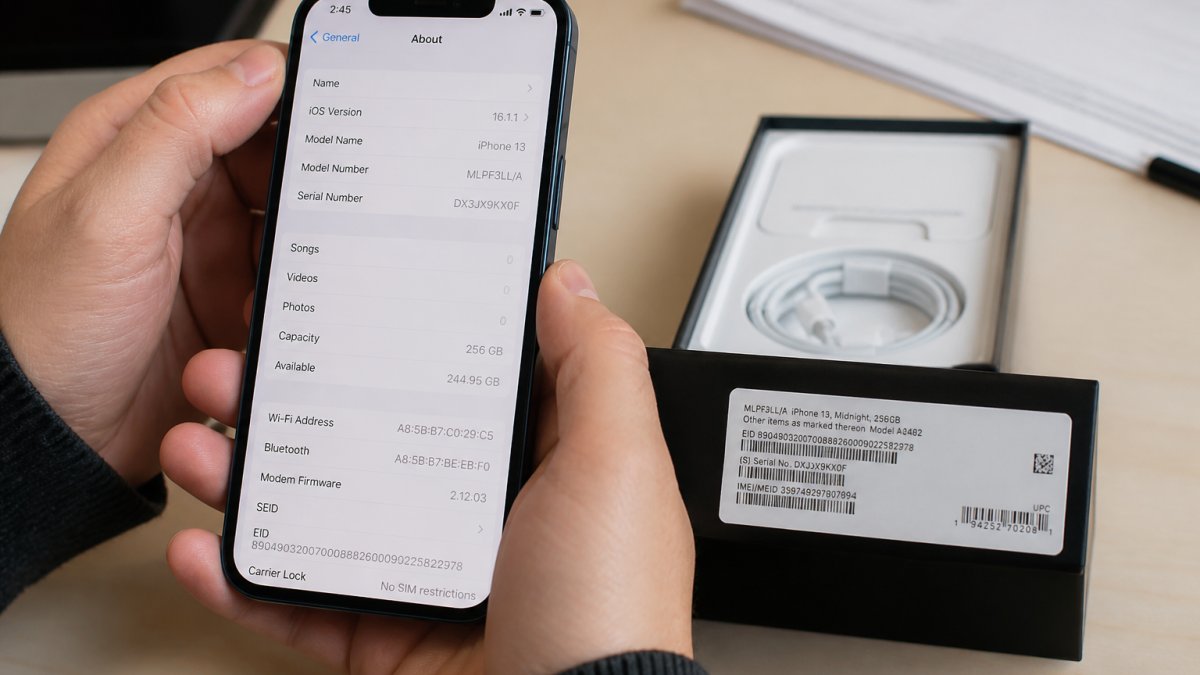
Here is the step-by-step process:
- Ask the seller for the IMEI and model number in writing.
- Confirm the IMEI matches across the box, the settings menu, and the listing.
- Run the number through a free IMEI lookup tool.
- Check that the phone is not reported lost or stolen.
- Confirm the model number matches the advertised device.
A mismatch between the IMEI on the box and the one in settings means the device has been swapped or rebuilt. That is a hard stop.
Serial Number Checks for Laptops, Tablets, and Consoles
The IMEI method is phone-specific. For everything else, the equivalent is the manufacturer's serial number, and the verification steps differ by category.
- Laptops. Ask for the serial number and the model number. On most laptops the serial is printed on the bottom panel and also stored in the system firmware, so you can cross-check it after delivery. Before buying, look up the serial on the manufacturer's own warranty or support page. A serial that returns "not found" or shows a different model than the listing is a red flag.
- Tablets. Serial numbers are usually in Settings under General or About, and on the original box. Wi-Fi-only tablets often have no IMEI at all, so do not treat a missing IMEI as proof of a fake. Check the serial against the manufacturer's coverage page instead.
- Game consoles. Consoles carry a serial number on the chassis and in the system settings. Ask for both, and confirm they match. A console with a mismatched or scratched-off serial is often a repaired or refurbished unit being sold as something it is not.
What a Serial Number Check Can and Cannot Tell You
A serial number check confirms three things: that the device exists in the manufacturer's records, that the model matches the listing, and whether the manufacturer's warranty is still active.
For stolen-device status, use the manufacturer's or carrier's own lookup tool where one is offered, and be cautious with third-party lookup sites that charge a fee for information you can often get free.
Samsung Electronics Galaxy Watch 4 Classic 46mm Smartwatch with ECG Monitor →
Cross-Checking the Listing Against the Device
Once you have the serial or IMEI, compare it against every other detail in the listing. Model number, storage capacity, color, and carrier lock status should all line up. A listing that says "unlocked" but returns a carrier-locked serial is not a small error; it usually means the seller is listing a different device than the one they will ship.
Refurbishment Grades and Condition Definitions: What 'Grade A' Actually Means
Refurbishment grades are not standardized across the industry, which is exactly why they cause so much confusion.
Ask each seller to define their own grades in writing:
- Grade A: Often means minimal cosmetic wear, screen and body in good shape
- Grade B: Usually allows visible scratches or scuffs, fully functional
- Grade C: Typically shows clear cosmetic damage but works properly
The grade describes appearance, not performance. A Grade B phone can run perfectly. A Grade A phone can still have a weak battery.
Ask directly: "What does your Grade A mean, and what battery health do you guarantee?" A seller who cannot answer clearly is guessing.
Refurbished Electronics Warranty and Return Policy: What a Real One Looks Like
A genuine refurbished electronics warranty and return policy is written, specific, and tied to the seller, not the manufacturer. Most manufacturer warranties do not cover refurbished devices bought from third parties.
A real policy includes:
- The warranty length in days or months
- What it covers, such as battery, screen, or hardware faults
- Who pays return shipping
If the listing says "final sale" or "no returns," treat it as a warning, not a minor detail. You have no protection if the device fails.
Questions to Ask Before Buying Refurbished Electronics
The right questions before buying refurbished electronics separate honest sellers from the rest. Ask them in writing so you have a record.
- What is the exact battery health or capacity?
- Who performed the refurbishment, and what did it include?
- Is the device fully unlocked for any carrier?
- What is the warranty length, and what does it cover?
- What is the return window and who pays return shipping?
- Can you send photos of the actual unit, powered on?
A credible seller answers all six without hesitation. Vague or evasive answers are your signal to move on.
What to Do When a Device Arrives Not as Described
Document everything the moment the package arrives. Photograph the box, the device, and any damage before you power it on.
Then:
- Test the device against the listing claims within the return window.
- Message the seller through the marketplace, not by text or email.
- Open a dispute if the seller stalls or refuses a return.
- Report the seller if the listing was misleading.
Marketplace dispute systems favor buyers who act fast and keep records. Waiting too long can close your window.
Buying refurbished should feel safe, not like a gamble. We offer a curated selection of refurbished Apple products and other electronics, each backed by a simple, secure checkout and clear condition details so you know what you are getting.
Frequently Asked Questions
How can you tell if a refurbished electronic device is genuine?
Check the serial number and IMEI against the manufacturer's own database before you pay. Ask the seller for a photo of the label on the device and the box, then confirm the model number matches the listing. A genuine refurbished electronics listing will also state who did the refurbishment (factory or third-party), what grade the unit is, and what warranty applies. If the seller dodges any of those three, treat it as a counterfeit device risk.
What are the warning signs of a fake refurbished electronics listing?
The clearest red flags are stock images instead of photos of the actual unit, an unusually low price compared to other listings, a seller account created recently with little history, and vague condition language like 'works great' with no grade or test details. Listings that skip the return policy, push payment outside the marketplace, or refuse to share a serial number are the ones most often tied to scams. Compare the listing text against the product photos for mismatches.
How do you verify a refurbished phone's serial number or IMEI?
Ask the seller to send a photo of the IMEI from the device's Settings > General > About screen, not just the box label. Then run that number through a free IMEI lookup service and the manufacturer's warranty checker. The model number, storage size, and color should all match the listing. If the IMEI comes back as reported lost or stolen, or the warranty check shows a different device, walk away. You can also ask the seller to read the IMEI aloud on a video call.
What should you do if a refurbished device is not as described?
Document everything the moment the package arrives: photograph the box, the device, and any damage before you power it on. Message the seller through the marketplace's own system so there is a written record, and request a return under the listed return policy. If the seller stalls, escalate to the marketplace's buyer protection team and, if you paid by credit card, file a dispute with your card issuer. Keep the original packaging until the return is resolved.