
Table of Contents
- How to Check Refurbished iPhone Battery Health in Settings
- What Is Good Battery Health for a Refurbished iPhone?
- How to Check iPhone Battery Cycle Count
- Red Flags: Unverified Batteries and Non-Genuine Parts
- Apple Battery Replacement Cost and When to Replace
- What to Expect from Smartcare Marketplace Refurbished iPhones
- Frequently Asked Questions
Last Updated: October 4, 2026
How to Check Refurbished iPhone Battery Health in Settings
Learning how to check refurbished iPhone battery health takes about 30 seconds, and it's the single most important thing to do before you trust a pre-owned phone.
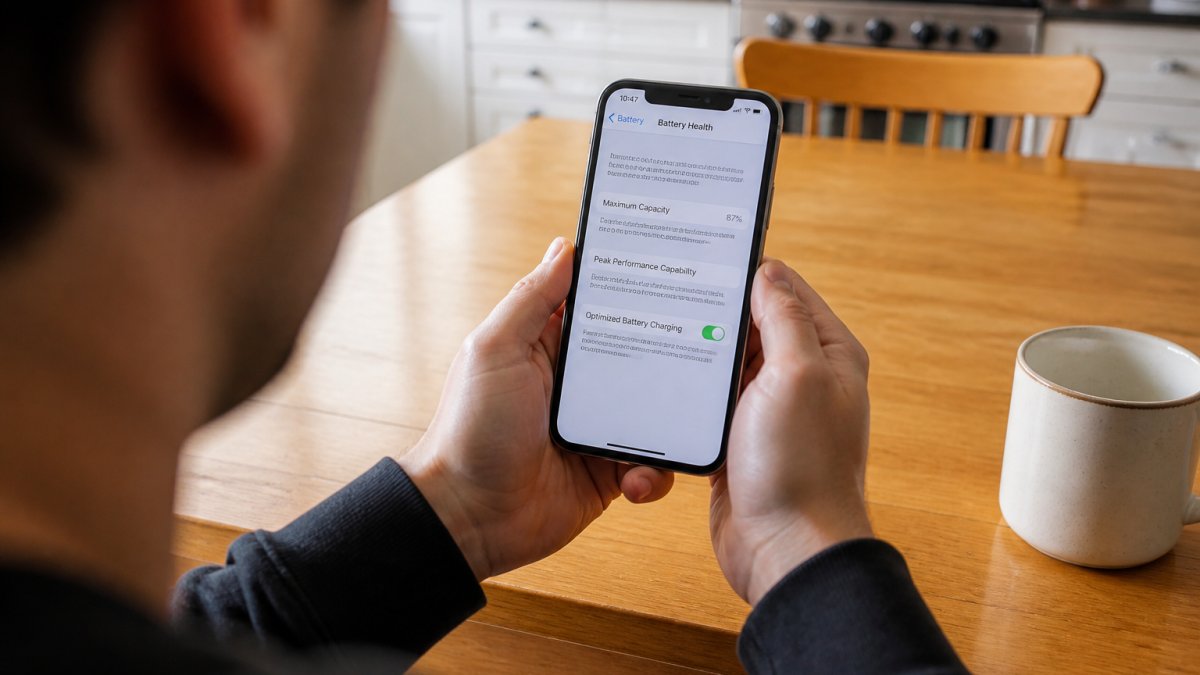
Here's the honest part most listings skip: sellers can reset a phone to factory settings, and the Settings app will still show real battery data. But that data only tells part of the story.
Step 1: Open Settings and Find Battery Health
Tap the gray gear icon to open the Settings app. Scroll down and tap Battery, then tap Battery Health & Charging. On most iPhones this sits two taps deep, so you'll find it fast. If the option is grayed out or missing, the phone may be running an old version of iOS or using a non-genuine battery that blocks the menu.
Step 2: Read Maximum Capacity and Peak Performance Capability
Maximum Capacity is the percentage of original charge your battery can still hold. Peak Performance Capability tells you whether the phone can deliver full power when the battery is under load. A phone showing 100% capacity but "Performance management applied" has a mismatch worth questioning. Apple's own guidance on iPhone battery and performance explains that aging batteries can trigger power management to prevent sudden shutdowns.
Step 3: Check for Important Battery Messages
Look for a yellow or red banner that says Important Battery Message. This appears when iOS cannot verify the battery is a genuine Apple part. An unverified battery isn't automatically dangerous, but it does mean Apple won't service it, and you lose access to full battery diagnostics. For a refurbished phone, this is a dealbreaker unless the seller disclosed it upfront and priced it accordingly.
What Is Good Battery Health for a Refurbished iPhone?
Good battery health for a refurbished iPhone is 85% Maximum Capacity or higher. Anything above 90% is excellent for a pre-owned phone. Between 80% and 85% is workable but expect to replace the battery within a year. Below 80%, Apple considers the battery degraded and recommends replacement.
A quick reference:
| Maximum Capacity | What It Means | Action |
|---|---|---|
| 90-100% | Excellent, like-new battery | Buy with confidence |
| 85-89% | Good, plenty of life left | Buy, monitor over time |
| 80-84% | Fair, nearing replacement | Negotiate price or plan a swap |
| Below 80% | Degraded, Apple flags it | Skip or replace immediately |
How to Check iPhone Battery Cycle Count
Cycle count is the single most useful number a refurbished buyer can pull, and almost no listing mentions it. Maximum Capacity tells you how much charge the battery holds right now.
A cycle count is the number of times the battery has been discharged by 100% of its capacity. Partial drains add up: two days of 50% discharge equals one full cycle.
Reading Cycle Count Against Maximum Capacity
The two numbers only make sense together. Here's how to read the combination on a refurbished phone:
| Cycle Count | Maximum Capacity | What It Suggests |
|---|---|---|
| Under 300 | 90%+ | Genuine low-use device, strong buy |
| Under 300 | 80-89% | Heavier heat or fast-charge history; usable but watch it |
| 300-500 | 85%+ | Normal mid-life battery, expect replacement within 1-2 years |
| 500-800 | Any | Past design life; budget for a replacement soon |
| Over 800 | Any | Near end of service life regardless of the capacity reading |
A phone showing 95% Maximum Capacity with 700 cycles is a contradiction worth questioning. Either the battery was recently replaced (ask for documentation) or the capacity reading was manipulated by a third-party battery management chip. Genuine batteries degrade in a predictable curve; a high capacity paired with a high cycle count usually means something was reset.
Using Analytics Data on the Device
Apple hides cycle count inside the Analytics Data logs, and you can read it without any tools:
- Open Settings, then Privacy & Security
- Tap Analytics & Improvements, then Analytics Data
- Scroll to a file starting with log-aggregate (there may be several, pick the most recent by date)
- Open it and search the text for "cycle_count"
- The number next to it is your total charging cycles
On newer iOS versions you may also see "last_value_CycleCount" in the same log. Either field works. The log is long and dense, so use the search bar inside the file rather than scrolling. This method works on any iPhone, including a factory-reset one, because the analytics log is stored on the device and survives the reset.
Third-Party Diagnostic Tools
Desktop tools read cycle count, design capacity, and current capacity straight from the phone's battery controller, which is faster and more reliable than parsing a log file. Common options include coconutBattery (macOS), iMazing (macOS and Windows), and 3uTools (Windows).
These tools also flag unverified battery status and show whether the battery matches the original equipment manufacturer spec. That matters at the point of sale: if you're inspecting a phone in person before buying, a laptop and a cable will tell you more in two minutes than the Settings app will in ten.
Red Flags: Unverified Batteries and Non-Genuine Parts
A non-genuine battery is the most common hidden defect in the refurbished market, and it's the one sellers are least likely to disclose. The good news is that iOS now surfaces it directly, you just have to know where to look. This is the check most buyers skip, and it's the one that separates a properly refurbished phone from a flipped one.
How to Find the "Unknown Part" Warning
When iOS can't verify a battery as a genuine Apple part, it logs a warning in two places:
Apple iPhone 11 - Fully Unlocked (Refurbished) →
- Settings > General > About. Scroll down past the model and serial number. If the battery was replaced with a non-genuine part or a genuine part moved from another iPhone without Apple's calibration, you'll see "Unknown Part" listed under the Battery section, sometimes with a date.
- Settings > Battery > Battery Health & Charging. A yellow or red banner reading Important Battery Message appears at the top, with text like "Unable to verify this iPhone has a genuine Apple battery."
Both warnings mean the same thing: the battery is not a verified Apple part, or it is a genuine part that Apple's system can't authenticate. The phone still works. But you lose detailed battery health data, Apple Stores may refuse to service the device, and the battery's actual age and quality are unknown.
What the Warning Does and Doesn't Tell You
The warning is a verification failure, not a safety verdict. A well-made third-party battery from a reputable refurbisher can perform fine for years.
A common pattern in the refurbished market is a genuine Apple battery pulled from a donor phone and installed in another device. The part is real, but because it wasn't paired to the new phone's logic board through Apple's calibration process, iOS flags it as unknown.
Other Signs of a Non-Genuine or Poorly Installed Battery
Software warnings don't catch everything. Watch for these physical and behavioral signs:
- Maximum Capacity stuck at 100% on a phone more than two years old, genuine batteries almost always show some degradation by then
- Sudden shutdowns even when the battery reads 30% or more, which points to a cell that can't deliver peak current
- Fast drain in the first hour after unplugging, especially if the percentage drops in uneven jumps
What to Ask the Seller Before You Buy
The FTC's guidance on refurbished electronics is clear that sellers must disclose material condition issues, and a replaced battery qualifies. If a listing doesn't mention one, ask directly:
- Was the battery replaced? If so, was it a genuine Apple part installed by Apple or an authorized service provider?
- Can you send a screenshot of Settings > General > About showing the Battery section?
- Does the device come with a warranty that covers the battery?
Run the About screen check and the Battery Health banner check before you pay. If either shows an unverified battery warning, treat it as a negotiating point, not an automatic no, but a reason to lower your offer or walk away.
Apple Battery Replacement Cost and When to Replace
Apple battery replacement cost through Apple's own service runs about $89 to $99 for most iPhone models, depending on the device. Third-party repair shops often charge less, but you'll lose the genuine-part verification. For a refurbished iPhone, weigh the replacement cost against what you paid. A $436 iPhone 11 with an 82% battery plus a $99 replacement still lands well under a new flagship.

Replace the battery when:
- Maximum Capacity drops below 80%
- You see "Service Recommended" under Battery Health
- The phone shuts down unexpectedly under load
- You plan to keep the device another 18+ months
For most refurbished buyers, a battery at 85% or higher means you won't need to think about replacement for a year or more. Buy at 80% or below and you're essentially buying a repair bill alongside the phone.
What to Expect from Smartcare Marketplace Refurbished iPhones
Every refurbished iPhone at Smartcare Marketplace goes through a three-step process: full inspection, testing and repair, then quality control. Every refurbished item is thoroughly quality checked and has a 30-day return policy.
A few models worth a look:
- Apple iPhone 11 (Refurbished) at $436.78, with up to 17 hours of video playback and a 3,110 mAh battery
- Apple iPhone 11 Pro Max (Refurbished) at $564.78, with a 6.5-inch Super Retina XDR display and all-day battery life
- Apple iPhone 14 Pro Max (Refurbished) at $1,318.38, with a 6.7-inch screen, 5G, and dual eSIM support
For a full breakdown of how refurbished devices are graded and tested, Apple's certified refurbished standards offer useful context on what a proper inspection should cover.


Frequently Asked Questions
Do refurbished iPhones have 100% battery health?
Not always. Reputable refurbishers may replace the battery with a new one, which can show 100% maximum capacity. Others sell devices with original batteries that have degraded to 80-90%. Always check the battery health in Settings before buying, and ask the seller if the battery was replaced. A 100% reading on an older model could also indicate a non-genuine replacement, so verify with a diagnostic tool.
Is 77% iPhone battery health bad?
Yes, 77% is considered poor. Apple recommends replacement when maximum capacity drops below 80%, as you may experience shorter runtime and unexpected shutdowns. If you see 77% on a refurbished iPhone, factor in the cost of a battery replacement or negotiate the price down. You can check the exact percentage in Settings > Battery > Battery Health & Charging.
How can I tell if an iPhone battery has been replaced?
Go to Settings > Battery > Battery Health. If you see an 'Important Battery Message' stating the battery is unverified, it likely means a non-genuine or improperly installed battery. You can also check the cycle count via Analytics data or a third-party tool like CoconutBattery. A cycle count inconsistent with the device's age can indicate a replacement.
What is the battery life of a refurbished iPhone?
Battery life varies by model and health. For example, a refurbished iPhone 11 with a healthy battery can deliver up to 17 hours of video playback. If the battery health is above 80%, you can expect close to original runtime. Below 80%, you may need to charge more frequently. Always check the maximum capacity percentage before purchasing.
A refurbished iPhone can serve you for years, but only if the battery underneath is honest. The catch is that battery health is the one spec most sellers gloss over, and it's the one that affects your daily experience the most. Smartcare Marketplace inspects every device, ships with a 30-day return policy, and lists real battery data so you know exactly what you're buying. Browse our refurbished iPhone lineup and find a device that keeps up with your day, not one that quits halfway through it.